# Custom Spell Card
This tutorial applies to the latest version of Touhou Little Maid mod.
# 1. Prerequisites
- Basic understanding of data structure and computer programming;
- Basic
JavaScriptknowledge, understand basicJavaScriptlanguage; - High school (or above) Mathematical knowledge, knows various expression for various basic functions;
- Script editing tool is a must,
VSCodeorAtomare recommended
# 2. To start
- After game is loaded, under the game menu, in
config\touhou_little_maid\custom_spell_cardfolder, default spellcard file is generated; - In this folder create a new file, file has to be
JavaScriptscripte file, and should be written using the format described below; - Use
/spell reloadcommand to reload all spell scripts; - Open the bookmark in the mod to find the written spells.
# 3. Details
# 1. Create a file
Build a new file with the extension name .js, there is no other naming requirement, but for uniformity, we suggest the following naming convention:
First find the English name of the spellcard you wished to recreate
Through https://en.touhouwiki.net/wiki/List_of_Spell_Cards you can find all the English name of spellcards that could be found ingame
Here we use
秋符「オータムスカイ」as example, its English name isAutumn Sign "Autumn Sky;Script name should be written as
autumn_sign.autumn_sky.js。
# 2. Script writing
In the script part of it is patterning, you can copy and paste it to use it, here is the template:
// Delayed task logic tool type
var Task = Java.type("com.github.tartaricacid.touhoulittlemaid.util.DelayedTask");
// Danmaku color class
var Color = Java.type("com.github.tartaricacid.touhoulittlemaid.danmaku.DanmakuColor");
// Danmaku type class
var Type = Java.type("com.github.tartaricacid.touhoulittlemaid.danmaku.DanmakuType");
// Danmaku wrapper
var Danmaku = Java.type("com.github.tartaricacid.touhoulittlemaid.danmaku.script.EntityDanmakuWrapper");
// 3D double precision floating point vector class
var Vec3d = Java.type("com.github.tartaricacid.touhoulittlemaid.danmaku.script.Vec3dWrapper");

Java.asJSONCompatible({
    // Spellcard ID, strings, required parameter, name conflict with spell cards are not allowed
    // Recommended format: resource_domain:some_spell.spell_card_name, use lowercase and underscores for naming
    id: "demo:autumn_sign.autumn_sky",
    // Non-required parameter
    // Without this field, system will automatically create a language key using spellcard ID
    nameKey: "spell_card.demo:autumn_sign.autumn_sky.name"
    // Non-required parameter
    // You can use this key to write language file, which provide spellcard's descriptive text
    descriptionKey: "spell_card.demo:autumn_sign.autumn_sky.desc"
    // Non-required parameter
    // Author name, string
    author: "tartaric_acid",
    // Non-required parameter
    // Version, string
    version: "1.0.0",
    // Non-required parameter
    // Cooldown time after using spellcard, round numbers
    cooldown: 250,
    /**
     * Executing spellcard logic, function signature fixed, it will call it instantly
     * @param world Current world
     * @param entity Release spellcard entity
     */
    spellCard: function (world, entity) {
        // Write here the actual logic after releasing spellcard, we will go into details below
    }
});
For example, we will write a simple one hit danmaku straight along the line of sight, here is part of code for the spellcard logic:
spellCard: function (world, entity) {
    // Create a danmaku entity
    // Its parameter are: world, entity that fires it, danmaku damage, danmaku gravity value, danamku type, danmaku color
    var danmaku = new Danmaku(world, entity, 2.0, 0.0, Type.PETAL, Color.MAGENTA);
    // Danmaku path of fire
    // Its parameter are: Entity that fires it, firing pitch, firing yaw
    // Pitch offset value, danmaku movement speed, danmaku inaccuracy
    danmaku.shoot(entity, 0, entity.getYaw(), 0, 0.4, 0);
    // Generate said danmaku
    world.spawnDanmaku(danmaku);
}
After writing the code, run reload spellcard command ingame, and you can find the spellcard in the creative menu.
Now we can modify the spellcard slight, to let it fire one shot of danmaku every half a second, for a total of 10 times. Now we will need the type Task, and by making a few changes to the basic of single shot danmaku, which will make this function happens:
spellCard: function (world, entity) {
    // for cycling it 10 times
    for (var i = 0; i < 10; i++) {
        // Task.add() method, there's two parameter
        // First parameter: A function without variable, here we are writing the danmaku logic in the last example
        // Second parameter: Delayed time, here we write i * 10 representing the logic for 10 tick, which is half a second it executes once
        Task.add(function () {
            var danmaku = new Danmaku(world, entity, 2.0, 0.0, Type.PETAL, Color.MAGENTA);
            danmaku.shoot(entity, 0, entity.getYaw(), 0, 0.4, 0);
            world.spawnDanmaku(danmaku);
        }, i * 10);
    }
}
# 3. Method list
Here list all the files for all the usable method:
# Danmaku type
Danmaku entity, when used will requires to be spawned, use World.spawnDanmaku(Danmaku danmaku) method to run the generation.
Build method:
Danmaku(World world, EntityLivingBase thrower, Type type, Color color)Parameter Type Description worldWorldThe world where danmaku entity is throwerEntityLivingBaseDanmaku thrower typeTypeDanmaku type, class colorColorDanmaku color, class Danmaku(World world, EntityLivingBase thrower,float damage, float gravity, Type type, Color color)Parameter Type Description worldWorldThe world the Danmaku is in throwerEntityLivingBaseThe Danmaku thrower damagefloatThe damage value of Danmaku gravityfloatThe gravity value of Danmaku, set as 0, it is not affected by gravity typeTypeDanmaku type, Class colorColorDanmaku color, Class Instance method:
void shoot(EntityLivingBase thrower, float pitch, float yaw, float pitchOffset, float velocity, float inaccuracy): Danmaku launch direction setting, no return value
| Parameter | Type | Description |
|---|---|---|
thrower | EntityLivingBase | The Danmaku thrower |
pitch | float | Danmaku pitch, unit is degree |
yaw | float | Danmaku yaw, unit is degree |
pitchOffset | float | Danmaku pitch offset value, final Danmaku pitch will move following pitch + pitchOffset angle |
velocity | float | Danmaku motion velocity |
inaccuracy | float | Danmaku inaccuracy, Danmaku will use the set direction as base, and will offset based on Gaussian random variable, which can be used to design some widespread Danmaku |
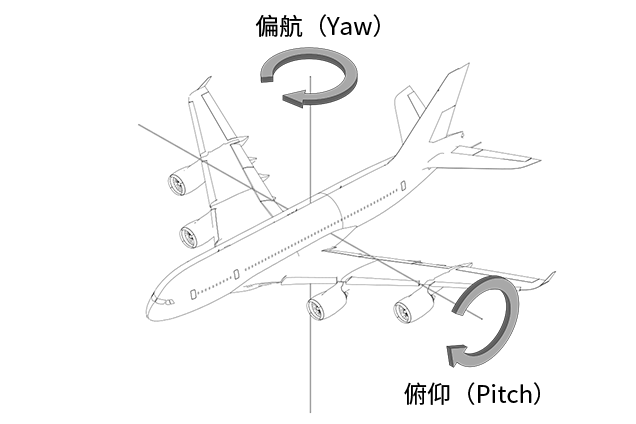
What is pitch and yaw?
Image and reference: https://en.wikipedia.org/wiki/Aircraft_principal_axes
void shoot(double x, double y, double z, float velocity, float inaccuracy):Danmaku launch direction setting, no return value
| Parameter | Type | Description |
|---|---|---|
x y z | double | The x y z coordinate that Danmaku is shot at |
velocity | float | Danmaku motion velocity |
inaccuracy | float | Danmaku inaccuracy, Danmaku will use the set direction as base, and will offset based on Gaussian random variable, which can be used to design some widespread Danmaku |
void setType(Type type): Set Danmaku type, no return value
| Paramteter | Type | Description |
|---|---|---|
type | Type | Danmaku type, Class |
void setColor(Color color): Set Danmaku color, no return value
| Parameter | Type | Description |
|---|---|---|
color | Color | Danmaku color, Class |
void setTicksExisted(int ticksExisted): Set Danmaku existance limit, when not set the default is 200 tick, no return value
| Parameter | Type | Description |
|---|---|---|
ticksExisted | int | Danmaku existance time |
void setPosition(Vec3d vec3d): Set Danmaku position, no return value
| Parameter | Type | Description |
|---|---|---|
vec3d | Vec3d | Danmaku coordinate |
void setDamagesTerrain(boolean canDamages): Set if Master Spark Danmaku could damage terrain, this parameter only works on Master Spark Danmaku, no return value
| Parameter | Type | Description |
|---|---|---|
canDamages | boolean | Default is false,if set to true, it will cause terrain damage and lag, use with caution |
# Type Class
Danmaku type class
| Class name | Description | Note |
|---|---|---|
PELLET | Pellet | |
BALL | Ball | |
ORBS | Orb | |
BIG_BALL | Big ball | |
BUBBLE | Bubble | |
HEART | Heart | |
JELLYBEAN | Jellybean | |
AMULET | Amulet | |
STAR | Star | |
BIG_STAR | Big Star | |
PETAL | Petal | |
KNIFE | Knife | |
MASTER_SPARK | Master spark | Will constantly release explosion effect |
BULLET | Bullet | |
KUNAI | Kunai | |
RAINDROP | Raindrop | |
ARROWHEAD | Arrowhead |
# Color Class
Danmaku Color Class
| Class name | Description |
|---|---|
RED | Red |
ORANGE | Orange |
YELLOW | Yellow |
LIME | Lime |
LIGHT_GREEN | Light green |
GREEN | Green |
CYAN | Cyan |
LIGHT_BLUE | Light Blue |
BLUE | Blue |
PURPLE | Purple |
MAGENTA | Magenta |
PINK | Pink |
GRAY | Gray |
# World Type
THis is the type of change to danmaku based on the input world in spellCard: function (world, entity)
void spawnDanmaku(Danmaku danmaku): Danmaku instance entered spawns in the world, no return world
| Parameter | Type | Description |
|---|---|---|
danmaku | Danmaku | The spawning of desired Danmaku instance |
# EntityLivingBase Type
THis is the type of change to danmaku based on the input entity in spellCard: function (world, entity)
float getYaw(): Get said entity's yaw, unit is degree, return value is floating point;
float getPitch(): Get said entity's pitch, unit is degree, return value is floating point;
Vec3d getPos(): Get the coordiante for said entity, return value is Vec3d type;
# Task type
A type used for delayed execution logic
void add(Function function, int delayedTick): Execute entered function according to the set tick delays, no return value
| Parameter | Type | Description |
|---|---|---|
function | Function | Parameterless function, in the function you can only call world and entity variable, or create internal variable, other external variables cannot be called |
delayedTick | int | The delayed tick amount |
Since the current JavaScript script decoder still have some support issue with the new version, function parameter can be written using anonymous function, example as below:
Task.add(function () {
    // Actual Danmaku Logic
}, delayedTick) // Parameter delayedTick should be set to the desired delayed time
void add(Function<Integer> function, int delayedTick,int times): Execute entered function according to the set tick delays, you can use the internol functional logic by entering int value from exterior, no return value
| Parameter | Type | Description |
|---|---|---|
function | Function<Integer> | Single int parameter function, in the function you can only call world, entity and time variable, or create internal variable, other external variables cannot be called |
delayedTick | int | The delayed tick amount |
times | int | int data from exterior, used mainly on for cycle count |
Example is as follow:
Task.add(function (times) {
    // Actual Danmaku Logic
    // Here you can use an additional times variable, this variable is entered using the times parameter below
}, delayedTick, times) // Parater delayedTick should be set to the desired delayed time
# Vec3d Type
A three dimensional floating type vector, used on some simple vector changes
Build method
Vec3d(double x, double y, double z): Build vector based onx y zenteredInstance method
double getX(): Get x coordinate for said vector, return value is double precision floating point valuedouble getY(): Get y coordinate for said vector, return value is double precision floating point valuedouble getZ(): Get z coordinate for said vector, return value is double precision floating point valueStatic method
Vec3d getRotationVector(double x, double y, double z, float yaw, double yOffset, EntityLivingBase entity): Convert relative vector(x,y,z)to absolute vector using entity as origin point
| Parameter | Type | Description |
|---|---|---|
x y z | double | Relative vector construct using x y z |
yaw | float | Vector yaw, unit is degree |
yOffset | double | Vector offset on y axis |
entity | EntityLivingBase | Entity reference point when doing offset, final vector construction will reference the face direction and coordinate of said entity, and construct an absolute vector |